

Concept
Attack paths
How a single compromised account becomes control of the whole domain, one ordinary-looking permission at a time.
On this page
In one sentence: an attack path is a chain of relationships, each harmless-looking on its own, that lets whoever controls the first account take over the last one.
Defenders think in lists. Attackers think in graphs.
Ask an administrator who can control the Domain Admins group and they'll check its members. An attacker asks a different question: who can control anything that can control anything that can control Domain Admins?
Active Directory is full of relationships: memberships, permissions on objects, who is signed in where, who may act on whose behalf. Each one gives some account a little power over another. Chain enough of them and an intern's laptop leads to the domain controllers. BloodHound, released in 2016 and now maintained by SpecterOps, maps these chains, and attackers and penetration testers have used it ever since. Pathwarden reads the same data, from the same collectors, so defenders can see what attackers see.
Anatomy of a path
- Any employeeone phishing email
- MemberOf
- Helpdeska support group
- AdminTo
- SRV-APP-07a member server
- HasSession

 Domain AdminTier Zero
Read it left to right. Each arrow means the account on the left gains power over the thing on the right:
- MemberOf: the employee is in the Helpdesk group, so they have whatever the group has.
- AdminTo: the Helpdesk group is a local administrator on SRV-APP-07, perhaps granted years ago for one support case.
- HasSession: a Domain Admin signed in to SRV-APP-07, so their credentials are in its memory, where any local administrator can take them.
No exploit was needed. Every step uses a permission someone granted on purpose. That's what makes attack paths so common, and so hard to see from a list of group members.
The relationships Pathwarden follows
Pathwarden builds a graph with one node per user, computer, group, OU, GPO, domain, certificate template and CA, and one edge per relationship, always pointing from the account or group that holds a capability to the object it acts on. It follows:
- Membership and logons: MemberOf, HasSession, AdminTo, CanRDP, CanPSRemote, ExecuteDCOM.
- Permissions: GenericAll, GenericWrite, WriteOwner, WriteDacl, Owns, AddMember, AddSelf, ForceChangePassword, AllExtendedRights, AddKeyCredentialLink, WriteSPN, WriteAccountRestrictions, WriteGPLink.
- Delegation: AllowedToDelegate, AllowedToAct, AddAllowedToAct, and CoerceToTGT for unconstrained delegation.
- Secrets: ReadLAPSPassword, SyncLAPSPassword, ReadGMSAPassword.
- Structure: Contains, GPLink, HasSIDHistory, and trusts inside a forest.
- Replication: DCSync, derived from the two replication rights.
- Certificate Services: ManageCA and the AD CS escalations Pathwarden detects (ESC1 to ESC10 and ESC13). The relays to a CA, ESC8 and ESC11, need no foothold, so they are findings anyone on the network can start, not steps in a path.
- Files on the domain controller*: write access to a GPO's SYSVOL folder or a logon script.
- Entra ID and hybrid*, with AzureHound data: role assignments, owners, password resets, application secrets, synchronized accounts.
The rules reference lists them all. Two kinds are deliberately not followed: trusts to other forests, where SID filtering decides (PW-012), and remote logon rights into domain controllers, since a session isn't control (PW-023). Both are reported instead.
Attack path findings and hygiene findings
Pathwarden sorts findings the way BloodHound Enterprise does:
- Attack path findings are relationships that lead somewhere an attacker wants to go: a broad group with a path to Tier Zero (PW-001), an account that can DCSync (PW-002), a Domain Admin signed in to a member server (PW-004). Each says how many users and computers can use it.
- Hygiene findings are weaknesses that make attacks easier but aren't a path on their own: computers without LAPS (PW-011), stale admin accounts (PW-009), an old krbtgt password (PW-014).
Seeing your paths
- The report draws each finding's example path, left to right, with every step named.
pathwarden path -i <collection> --from jdoeshows the shortest path from one account to Tier Zero.pathwarden exposure -i <collection> --samples 10shows example paths per domain.pathwarden choke-pointslists the single relationships the most paths go through.- The app's Explore page lets you page through findings with their paths drawn, expand any object's relationships, and list everything that can reach an object.
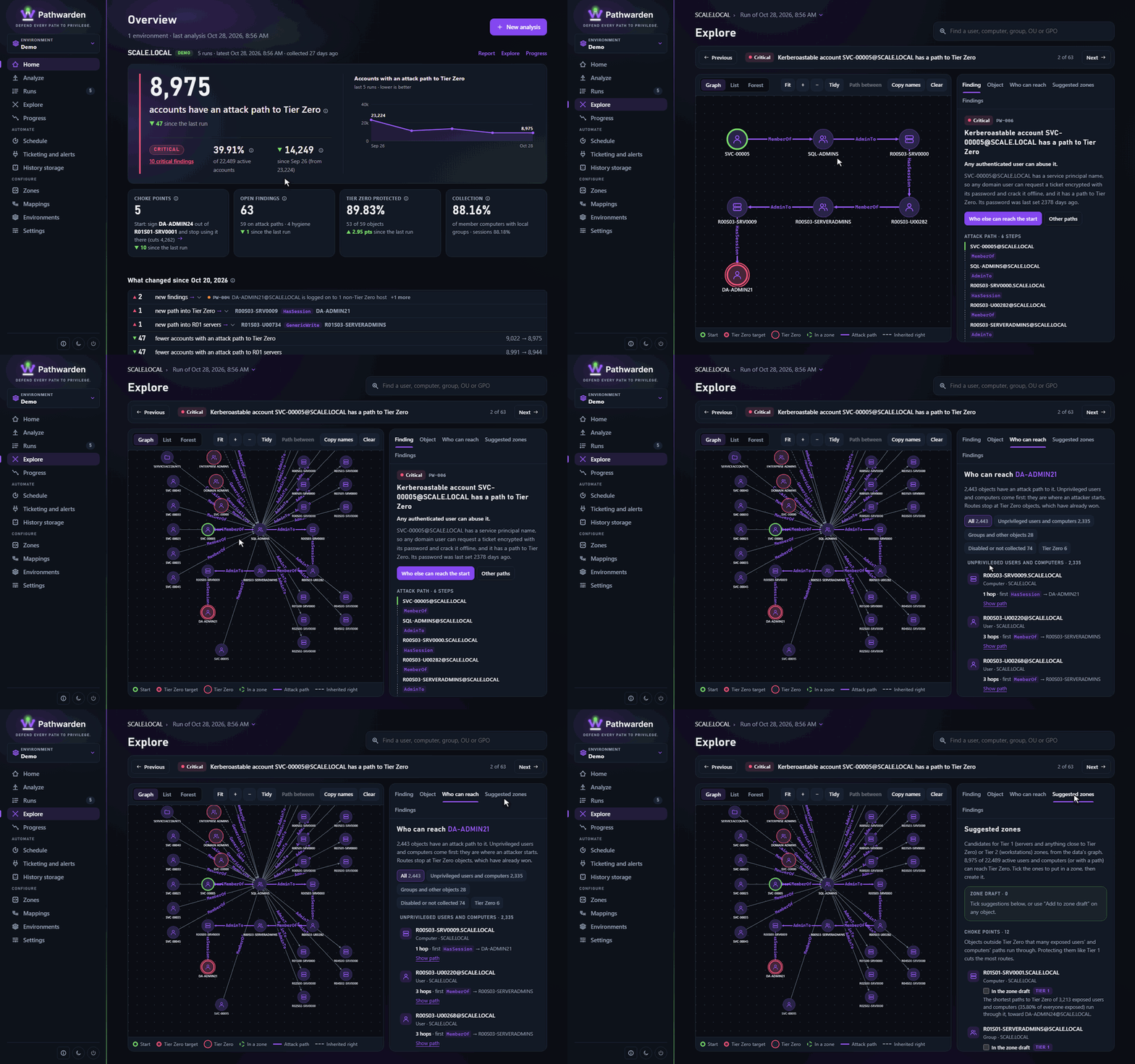
Paths are only as complete as the data. Paths through logons and local administrator rights need sessions and local groups, which only SharpHound (or the built-in collector* with a password and --scope all) collects. The report's Collection completeness says how much was seen. See collecting data.
References
- SpecterOps BloodHound docs: edges, for example AdminTo and HasSession
- Microsoft: Best practices for securing Active Directory
- MITRE ATT&CK: T1098 Account Manipulation, T1003.001 LSASS Memory
Very new and undergoing testing. These features haven't received a lot of testing yet. Try them out and let us know what's working.