

Collect and analyze
How Pathwarden works
On this page
Pathwarden reads a collection of Active Directory and reports who can reach Tier Zero and how, the findings, the smallest set of changes that closes every path, and what changed since the last run.
1. What it reads
- SharpHound or RustHound-CE output (JSON v5 or v6), as
.jsonfiles,.ziparchives or folders. Several domains load as one graph. - OpenGraph files and AzureHound files, next to the AD data.
Age-based rules count from the collection time, not from today.
2. Tier Zero
Tier Zero is everything that controls the domain: the domains, domain
controllers and AdminSDHolder, the built-in admin groups and accounts,
krbtgt, the AD CS trust anchors and their computers, GPOs linked to Tier
Zero, management planes the directory shows (Entra Connect, SCOM, SCCM and
WSUS servers that manage domain controllers; PW-025 asks you to confirm
each), Entra Tier Zero roles with AzureHound data, and anything you add
with tier_zero = [...].
Members of Tier Zero groups are Tier Zero too, except Domain Users, Domain Computers, Authenticated Users and Everyone. One of those in an admin group is a finding (PW-001).
A Privilege Zone is another set of systems you protect the same way, such as Tier 1 servers.
3. The numbers
| Term | Meaning |
|---|---|
| Accounts with an attack path to Tier Zero | The headline. Each one is a way to take over the domain. |
| Tier Zero exposure | Those accounts as a share of the active ones (logged on within stale_days, 90 by default) plus the inactive ones with a path. |
| Tier Zero protected | Tier Zero objects no open attack path finding leads to: "58 of 59 objects (98.31%)". |
| Collection completeness | The share of active computers whose sessions and local groups were collected. |
4. Exposure and severity
Tier Zero status comes from the paths and the open findings:
| Status | When |
|---|---|
| Critical | Domain Users, Domain Computers, Authenticated Users, Everyone or BUILTIN\Users can reach Tier Zero, or a critical finding is open. |
| High | At least one account outside Tier Zero can reach it. |
| Moderate | No account can reach it, but findings of medium or above are open. |
| Low | No account can reach it, and nothing of medium or above is open. |
An attack path finding's severity follows the share of its domain that can reach it: 95% Critical, 80% High, 40% Medium, otherwise Low. Direct control of the domain (DCSync, control of Tier Zero objects, unconstrained delegation, AD CS abuse) is at least High. You can change a rule's severity in Settings › Rules.
5. Findings and the remediation path
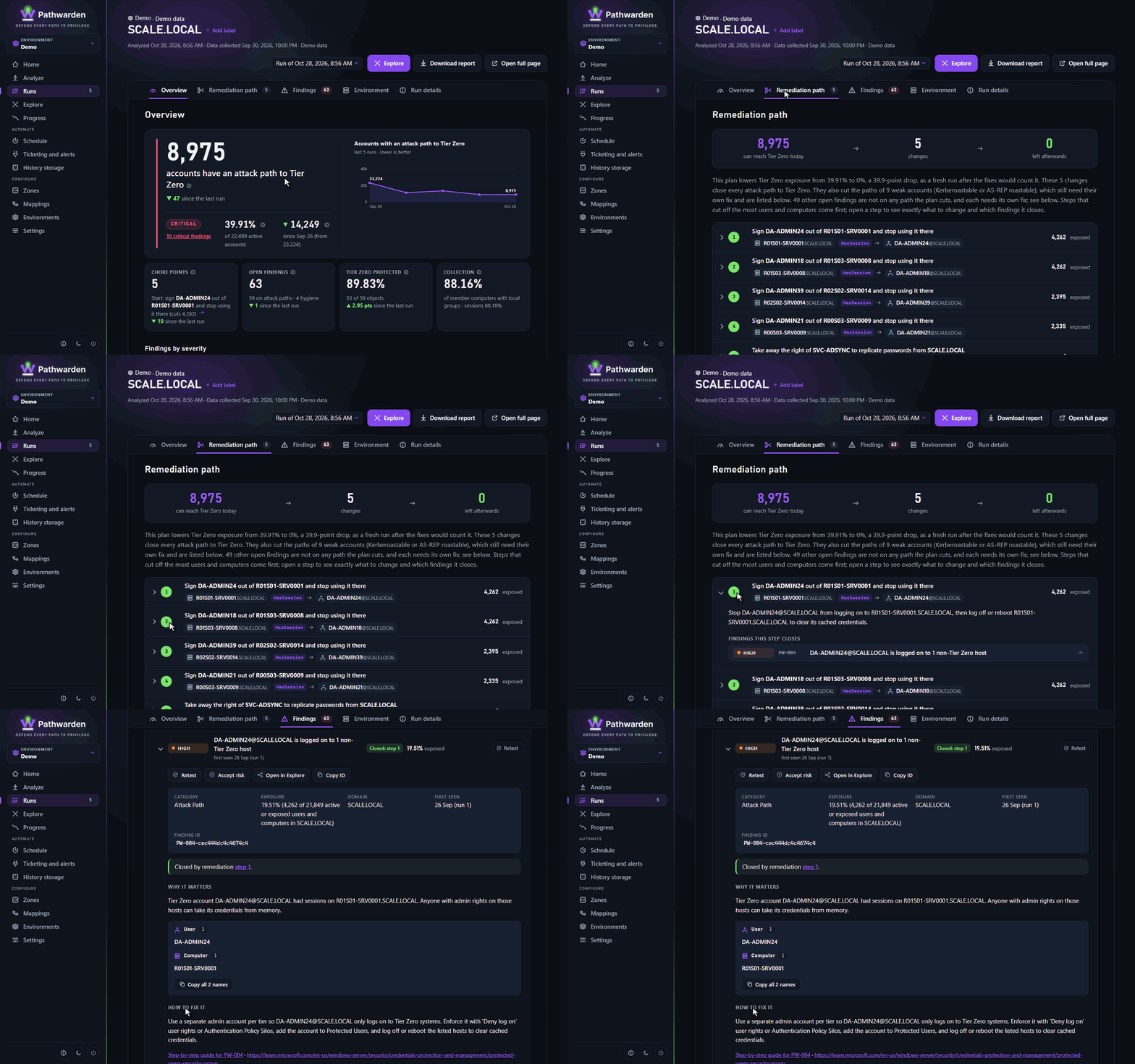
The 38 rules report each problem where the fix happens. Each finding has a finding ID that stays the same while the problem exists, for tickets and accepted risks.
The remediation path is the smallest set of changes that cuts every account off from Tier Zero, most effective first. It never proposes a change that can't be made, such as removing Domain Users membership. Findings it doesn't close, such as weak accounts, are marked Fix directly.
6. Change tracking
Each analysis compares with the run history. A finding is New, Open, Back (fixed earlier), Accepted risk, Fixed or Can't tell (its part of the collection is missing, so it isn't closed). A failed or much smaller collection doesn't close tickets.
The run history names accounts and computers: store it like the collection, or encrypt it.
What it doesn't cover
Azure resources, all of BloodHound CE's Cypher (pathwarden query runs a
part), and AD CS ESC14 and ESC15. See the
coverage comparison.
Generated from docs/how-it-works.md in the Pathwarden repository, version 1.0.0-rc.1.