

Beyond Active Directory
OpenGraph data (TaskHound, MSSQLHound, ...)
On this page
Specialist collectors such as TaskHound, MSSQLHound and ConfigManBearPig write BloodHound OpenGraph files. Pathwarden reads them next to your AD collection. A file only adds attack paths through a trusted mapping pack, and its findings are only marked fixed when a coverage file shows the collector looked again.
Add OpenGraph files
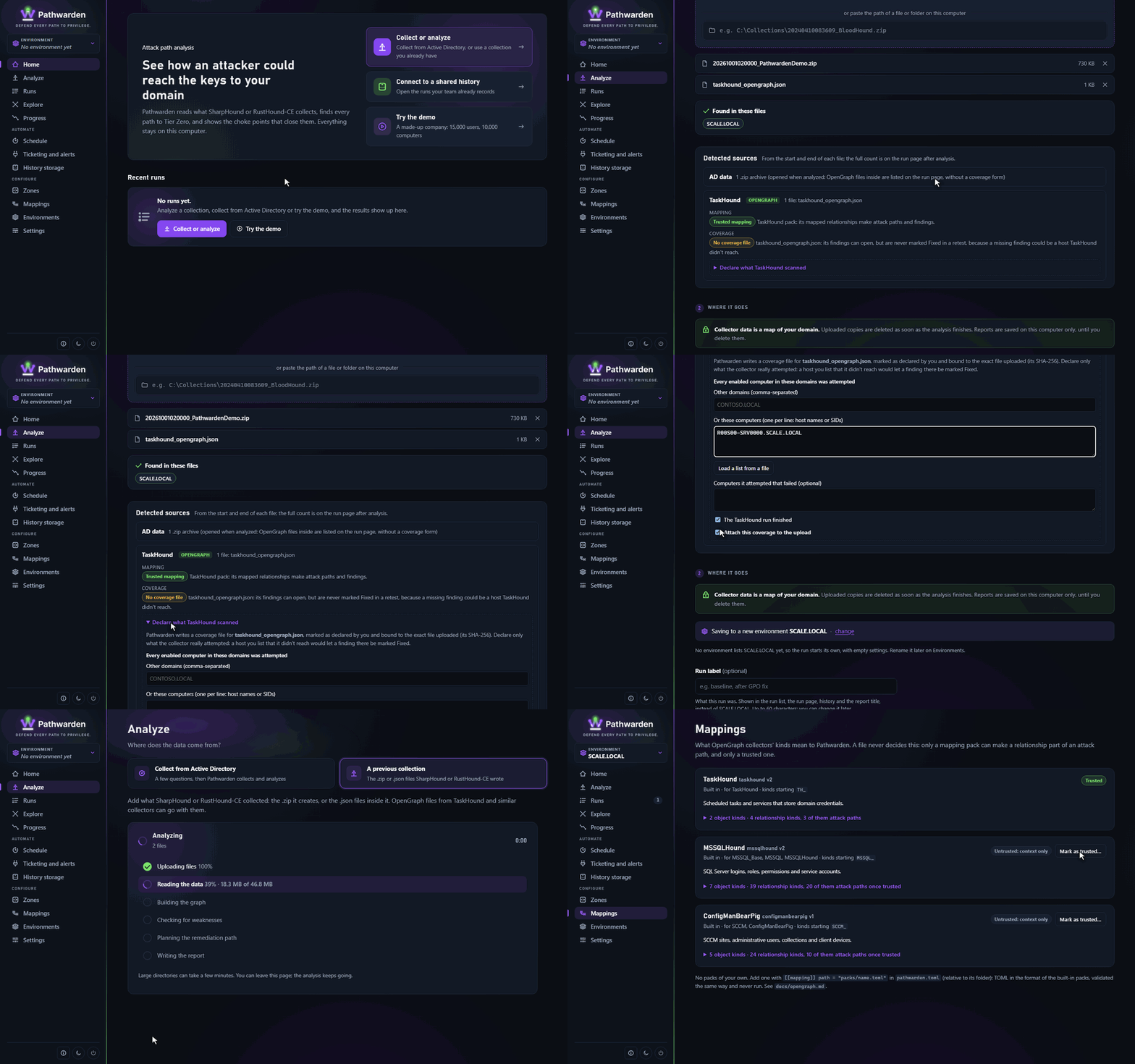
In the app
- In the rail, click Analyze, then A previous collection.
- Add the AD collection and the OpenGraph files together.
- Check the Detected sources panel: each source, its pack, and whether a coverage file came with it.
- For a file without a coverage file, click Declare what source scanned and fill in what it scanned.
- Click Start analysis.
On the command line
pathwarden report -i corp-sharphound.zip -i taskhound_opengraph.json -o report.htmlFiles, folders and zips work, under any name. OpenGraph files alone are not a collection. The report's Data sources lists each source.
A file can never set Tier Zero, domain controllers or zones, and its native
AD relationships (MemberOf, GenericAll, ...) are dropped.
Built-in packs
| Pack | Trusted | Finding into Tier Zero |
|---|---|---|
taskhound | Yes. | PW-033: a Tier Zero account's password is stored on a host. |
mssqlhound | No. | PW-034: SQL Server runs as a Tier Zero account. |
configmanbearpig | No. | PW-035: SCCM manages a Tier Zero computer. |
azurehound | Yes. | PW-031, PW-032 (Entra ID). |
Any other trusted relationship into Tier Zero is a PW-030 finding. An untrusted pack's relationships show in Explore as context only.
TaskHound writes no coverage file, so its findings can open but never resolve until you add one.
Trust a pack
In the app
- In the rail, under Configure, click Mappings.
- Open the pack and read every relationship kind marked as a path.
- Click Mark as trusted… and confirm.
On the command line
pathwarden mappings show mssqlhound pathwarden mappings trust mssqlhound --reviewed
Before you trust a pack, analyze its files untrusted and check Data sources: almost every AD end should resolve. Then trust it for a test and compare the findings with what you know.
To add your own pack, list it in pathwarden.toml and start from a
built-in one in crates/pathwarden-core/packs/:
[[mapping]]
path = "packs/custom-sccm.toml"
Coverage files
A coverage file tells Pathwarden which computers a collector scanned. Put
it next to the OpenGraph file as <payload>.coverage.json
(taskhound.coverage.json), in the same folder or zip:
{
  "schema": "pathwarden.coverage.v1",
  "source_kind": "TaskHound",
  "payloads": [{ "file": "taskhound.json", "sha256": "<sha256 of taskhound.json>" }],
  "collector": { "name": "TaskHound", "version": "1.2.0", "via": "manual" },
  "domains": ["SCALE.LOCAL"],
  "units": { "type": "computer", "ok": ["APP01.SCALE.LOCAL", "APP02.SCALE.LOCAL"], "failed": [] },
  "complete": true,
  "asserted_by": "user"
}
(Get-FileHash taskhound.json -Algorithm SHA256).Hash gives the hash. A
file that doesn't match is ignored. List in units.ok only computers the
collector really read: a computer listed by mistake lets its findings be
marked fixed.
In the app, Declare what source scanned writes this file for a loose
.json upload.
"Can't tell" and held findings
A finding that rests on OpenGraph data is marked fixed only when this run
read its source whole, with a matching coverage file that says complete
and lists every computer the finding depends on. Otherwise the finding is
held (still open) in the run history, and Can't tell in a retest.
When a source the last run had is missing, every attack path finding is held, because a path may also run through that source.
What can go wrong
| Problem | Fix |
|---|---|
| A source's relationships show only as context. | Its pack is untrusted, or no pack describes them. Review and trust the pack. |
| Findings never resolve. | Add a coverage file, or regenerate it so its hash matches. |
| Every attack path finding is held. | Add the missing source back to the analysis. |
| "read only part way". | Raise the key the warning names under [opengraph]. |
| The settings file doesn't load after adding a pack. | Fix the reason the error gives. |
vCenter and CyberArk have no pack: see vCenter and CyberArk.
Generated from docs/opengraph.md in the Pathwarden repository, version 1.0.0-rc.1.