

Collect and analyze
Configuring Privilege Zones
On this page
A Privilege Zone is a set of objects you protect the way Pathwarden protects Tier Zero, such as "Tier 1 servers" or a finance application. For each zone, Pathwarden reports:
- Exposure: the users and computers outside the zone with an attack path into it.
- Protected: the zone objects no open attack path finding leads to.
- PW-022 findings: each account outside the zone that controls an object in it.
Tier Zero is never part of a zone, and an account that can reach Tier Zero
counts as reaching every zone. pathwarden plan --zone gives the
remediation path for a zone; the report and the app give it for Tier Zero
only.
Create a zone
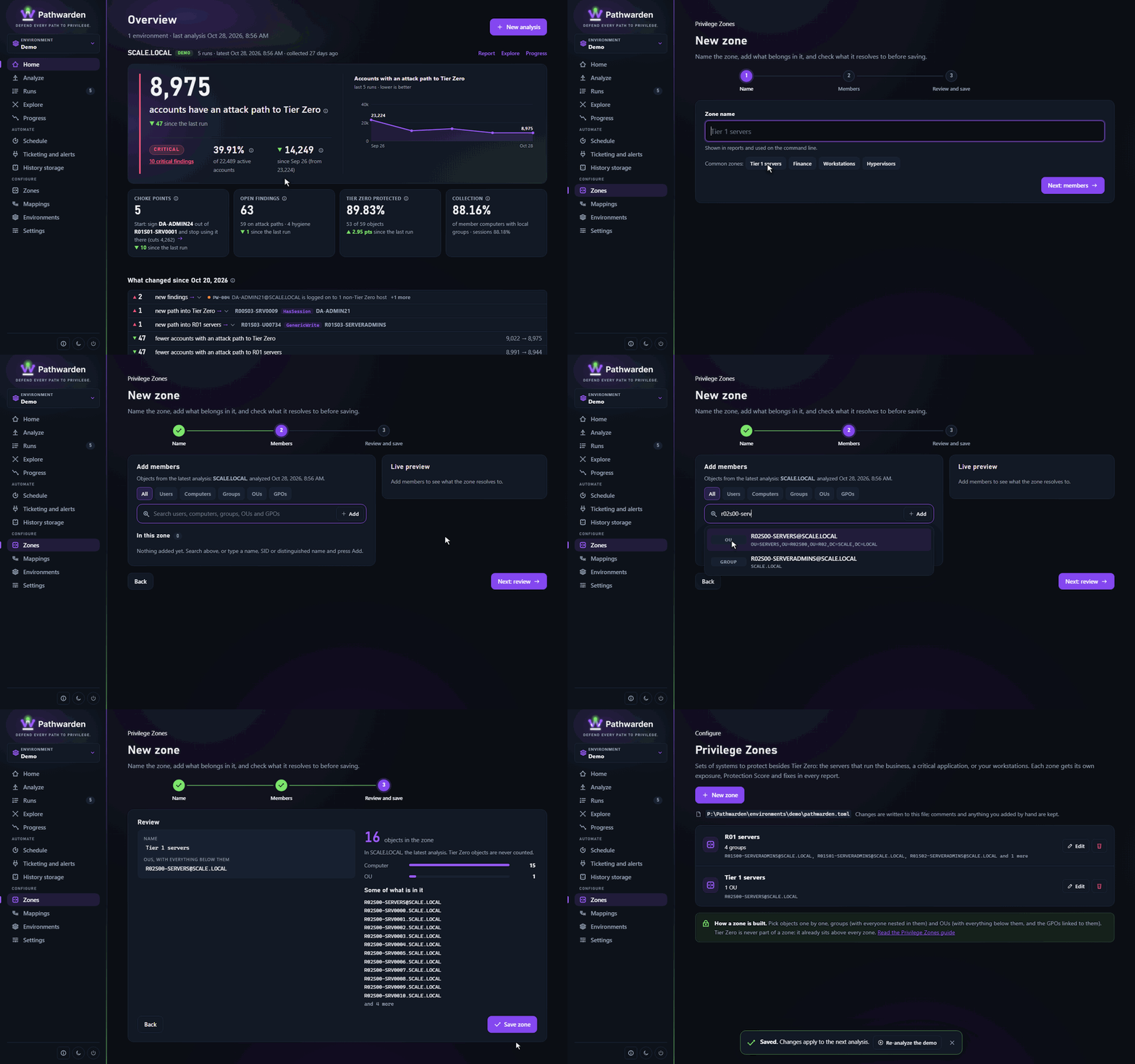
In the app
- In the rail, under Configure, click Zones, then New zone.
- Type the Zone name and click Next: members.
- Add users, computers, groups, OUs and GPOs. The Live preview shows what the zone holds and warns about entries that match nothing. Click Next: review.
- Click Save zone. The zone applies from the next analysis.
On the command line
Add the zone to pathwarden.toml:
[[zone]]
name = "Tier 1 servers"
groups = ["TIER1 ADMINS@SCALE.LOCAL"]
ous = ["OU=SERVERS,DC=SCALE,DC=LOCAL"]
members = ["SVC_SQL@SCALE.LOCAL"]
Or let pathwarden zones add write it, then check it:
pathwarden zones add "Tier 1 servers" --group "TIER1 ADMINS@SCALE.LOCAL" --ou "OU=SERVERS,DC=SCALE,DC=LOCAL"
pathwarden zones preview "Tier 1 servers" -i collection.zip
pathwarden posture -i collection.zip -c pathwarden.toml
pathwarden plan -i collection.zip -c pathwarden.toml --zone "Tier 1 servers"
More: The app.
Membership
A zone is the union of its keys:
members: the listed objects only.groups: the group and all its members, nested groups included.ous: the OU, everything below it, and the GPOs linked to it.
Write names as BloodHound shows them (TIER1 ADMINS@SCALE.LOCAL,
SQL01.SCALE.LOCAL, OU=SERVERS,DC=SCALE,DC=LOCAL), or give a SID or GUID.
Names match in any case. A zone can't be named "Tier Zero", and two zones
can't share a name.
Planning zones
- Include the administrators of the systems, not only the systems. Otherwise each of their permissions shows up as a PW-022 finding.
- Prefer groups and OUs to member lists, so the zone follows changes.
- Put anything that can take over a domain controller (backup servers,
hypervisors, password vaults) in Tier Zero with
tier_zero = [...], not in a zone.
Checking the result
- Pathwarden warns about each entry that matches nothing, usually a typo or
a missing
@DOMAIN. - A zone with far more objects than expected usually holds a group that nests Domain Users or Domain Computers.
- For each PW-022 finding, fix the access (
pathwarden guide PW-022), add the account to the zone if it manages it, or accept the risk.
Zone administrators' logons on computers outside the zone are not reported yet.
Generated from docs/privilege-zones.md in the Pathwarden repository, version 1.0.0-rc.1.